Automated Email List Segmentation in HighLevel: Workflow, Tags, and Time-Based Filters That Boost Opens and Sales

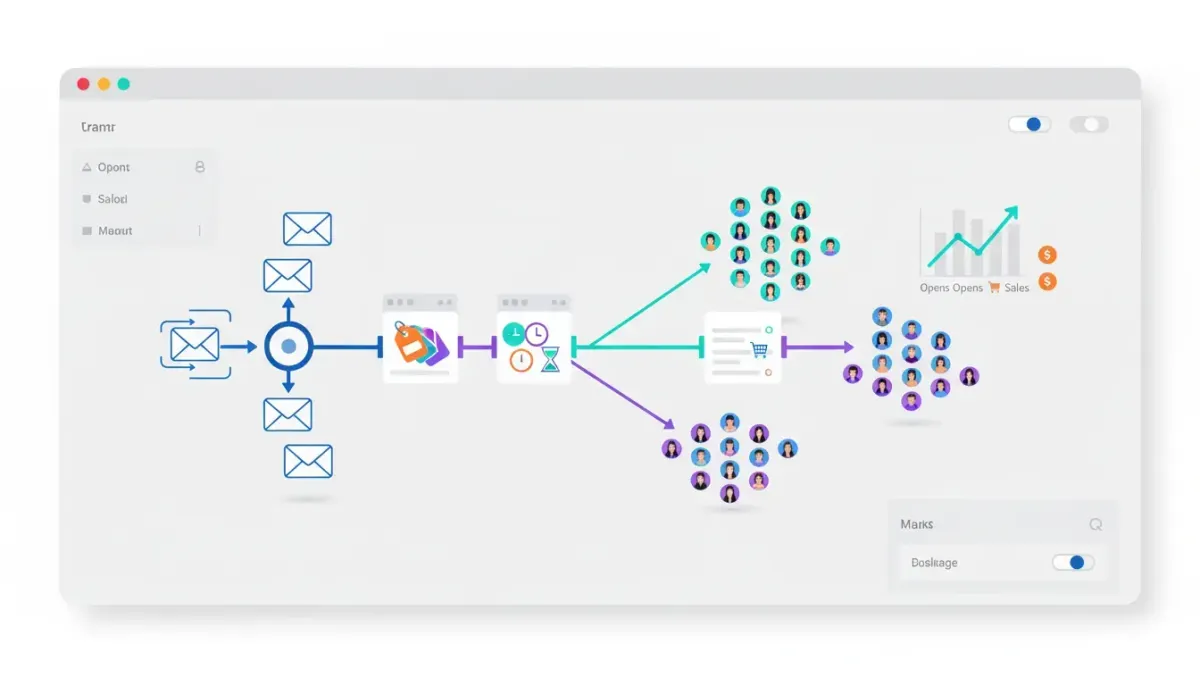
Segmenting an email list automatically in HighLevel (GoHighLevel) turns raw contact data into targeted campaigns that get higher open rates, more clicks, and better conversion. This guide explains a practical, scalable segmentation system you can implement with HighLevel workflows, tags, contact filters, and automations. Follow the step-by-step setup, examples, and best practices to stop blasting everyone and start sending the right message to the right person at the right time.
Why automated segmentation matters for agencies and SMBs
Generic email blasts waste attention, damage deliverability, and produce low ROI. Automated segmentation does three things that matter for agency operations and SaaS-driven CRM workflows:
- Improves deliverability by removing bounced addresses and suppressing disengaged contacts.
- Increases engagement by sending offers to people who recently opened or clicked emails.
- Streamlines follow-up by triggering sales actions when contacts show buying intent.
HighLevel workflows and automations make this repeatable across dozens of clients or campaigns, helping agencies scale predictable email outcomes without manual list management.
Core segmentation framework: Levels 1–3
Use a three-level framework to start simple and grow into hyper-segmentation:
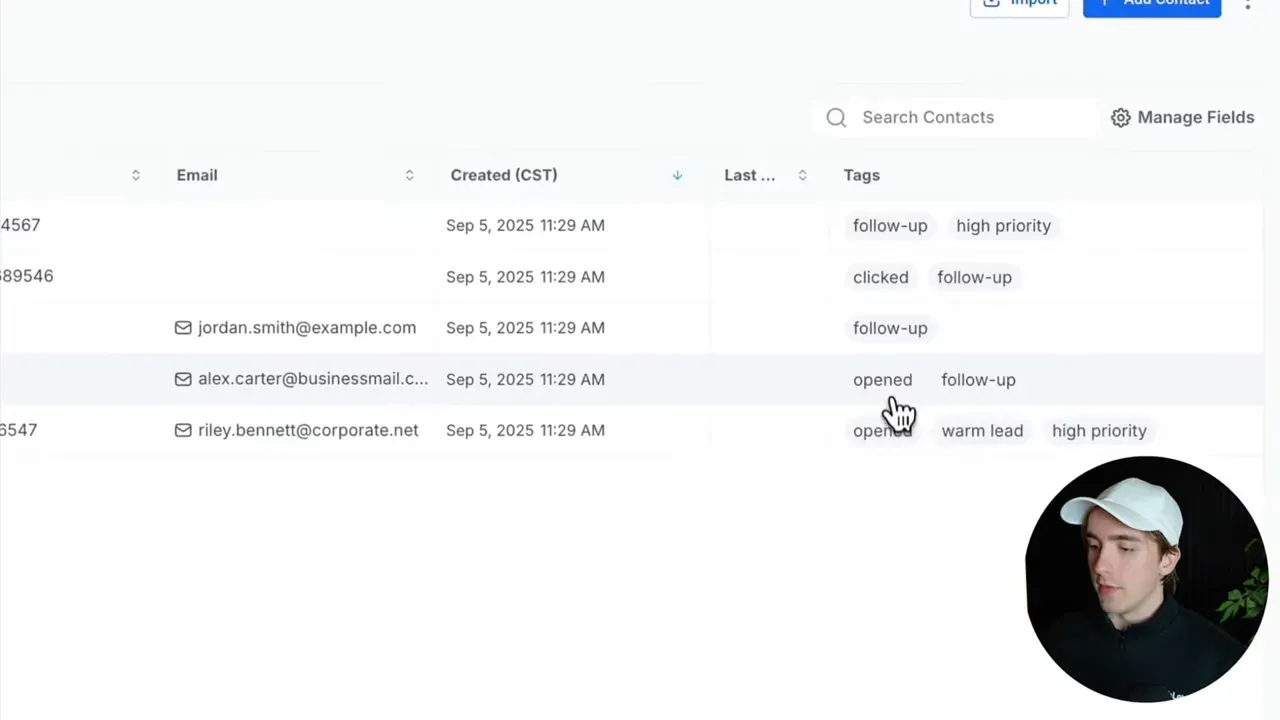
- Level 1 — Event tagging: Automatically tag contacts when an email bounces, is opened, is clicked, or when a contact unsubscribes or marks spam.
- Level 2 — Role-based tags: Tag paying customers separately (for example, payment received or customer tag) so you can exclude them from promotional campaigns meant for leads.
- Level 3 — Time-based filters: Use "last email opened" and "last email clicked" date filters to find who engaged recently versus historic engagers.
This structure supports simple suppression lists (bounced, do not disturb), engagement-driven offers (opened, clicked), and dynamic sales outreach (clicked recently + not a customer).
Step-by-step: Set up essential workflows in HighLevel
Follow these steps inside HighLevel to create the foundation for automated segmentation.
1. Create four basic email event workflows
Create workflows that trigger on email events, then apply a tag for each event. Recommended initial workflows:
- Tag: bounced — trigger: email status = bounced.
- Tag: opened — trigger: email event = opened.
- Tag: clicked — trigger: email event = clicked.
- Tag: do-not-disturb — trigger: unsubscribed or complaint; optionally remove contact from other workflows.
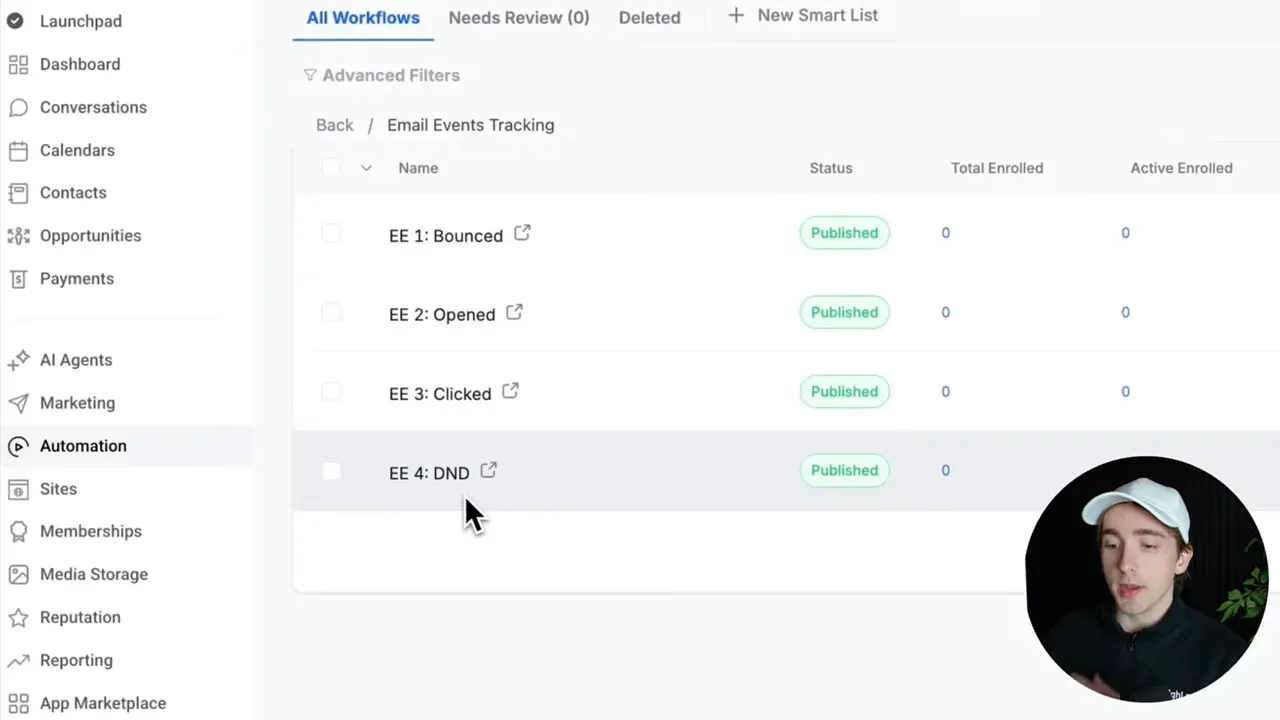
These tags become your basic suppression and engagement signals across campaigns. Bounced contacts can be archived or deleted to protect sender reputation.
2. Add a payment received / customer workflow
Tag contacts as customer when a payment is received or when you add a customer tag from your billing automation. This ensures you can exclude customers from lead-nurture promotions or run customer-specific onboarding campaigns.
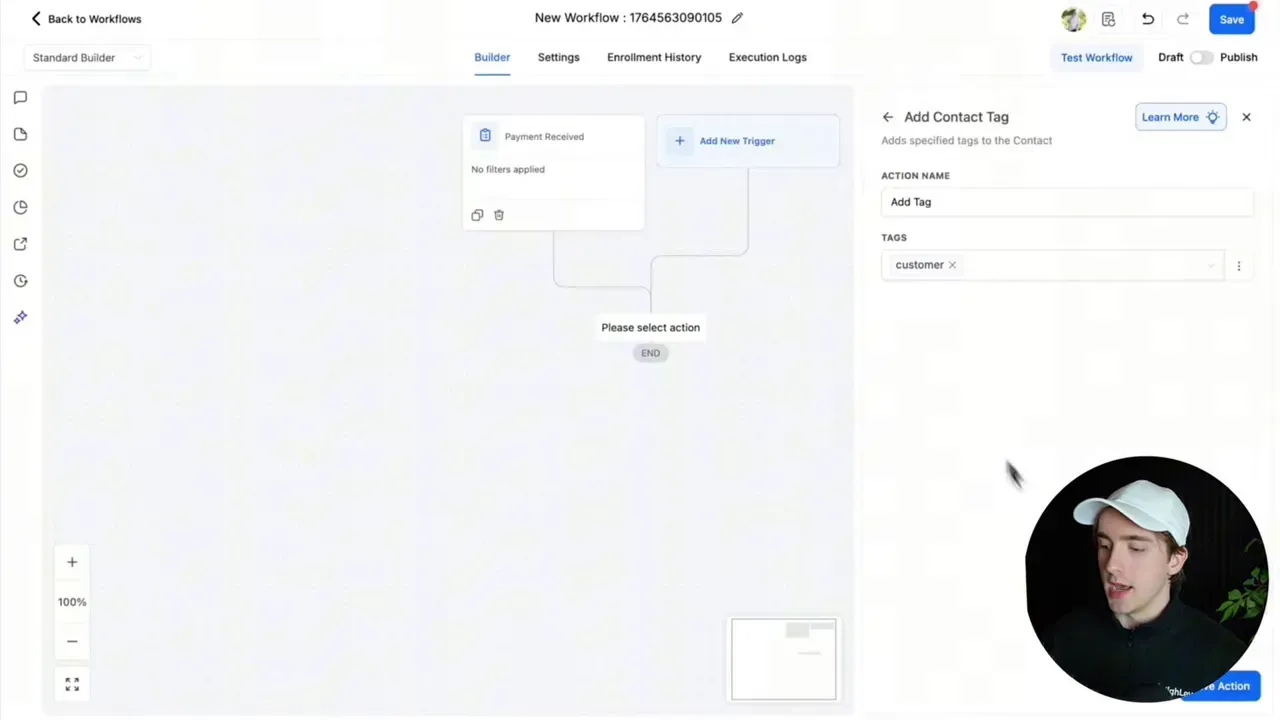
Make sure this workflow runs immediately after payment or at the moment a status flips to customer in your CRM.
3. Use tags and optional "remove from workflow" actions
For unsubscribe/complaint workflows, include a step to remove the contact from other active automations. That prevents accidental sends and keeps compliance tidy.
Advanced filters and timeframes: hyper-segmentation
Tags alone can get stale. Add date-based contact filters to isolate recently engaged contacts and avoid marketing to people who only engaged months ago.
Key filters to use in HighLevel contact screens
- Last email opened is within X days — find contacts who opened messages recently.
- Last email clicked is within X days — identify hot leads who clicked links.
- Tag is not customer combined with last-clicked filters — surface non-customers who are highly engaged.
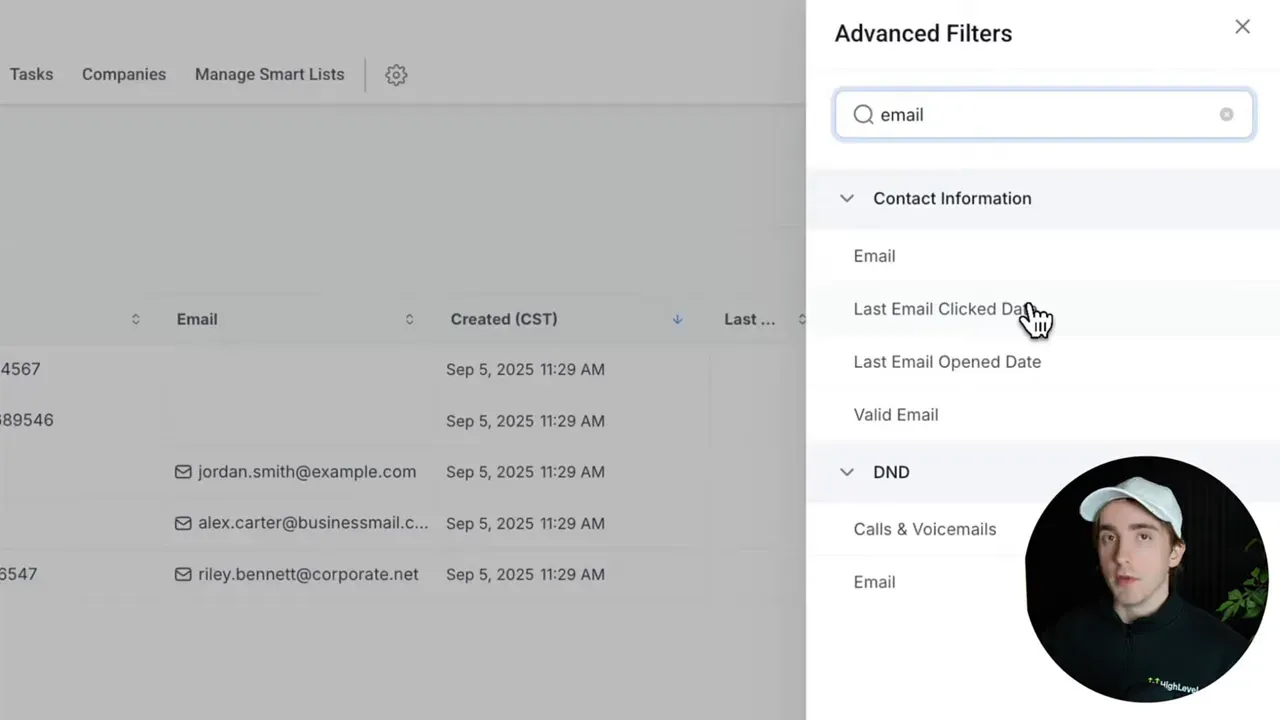
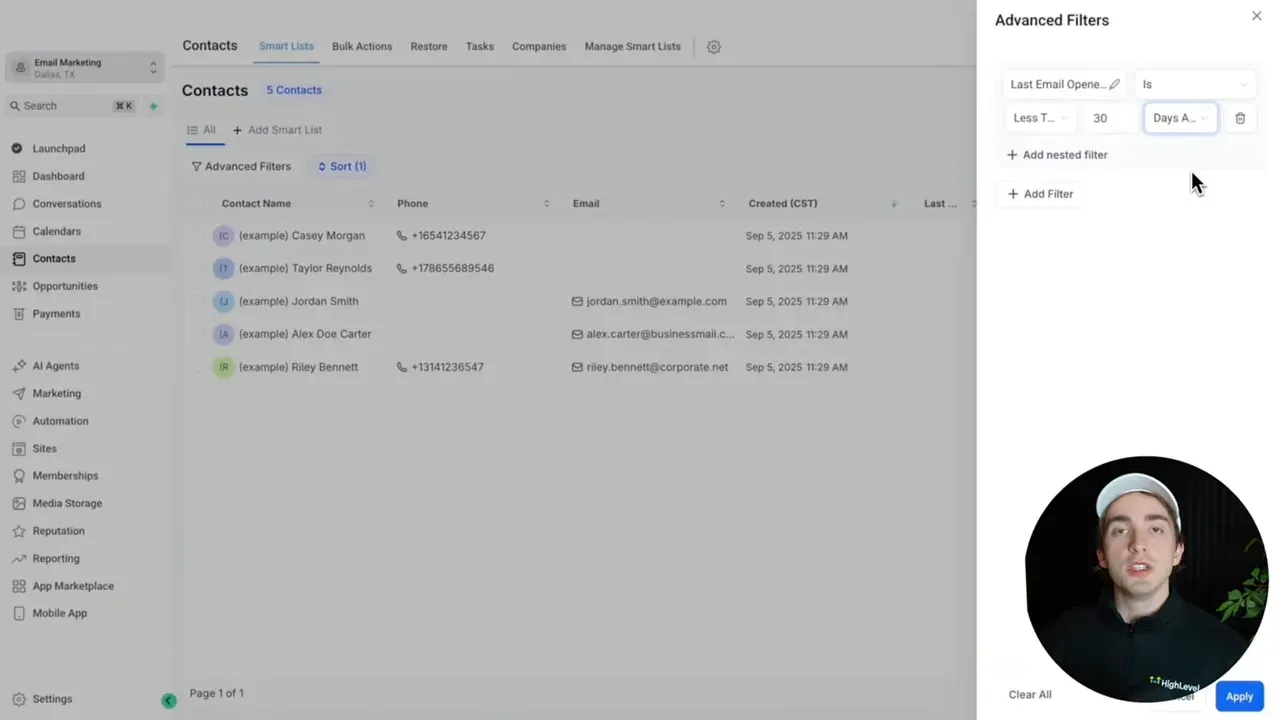
Example: filter for "last email clicked less than 30 days" and "tag is not customer" to produce a shortlist of warm leads that sales should contact first.
Automation ideas: turn engagement into actions
Segmentation becomes valuable only when it triggers meaningful actions. Use these automations to convert engagement into revenue:
Hot lead workflow (clicked and phone number present)
- Trigger: email event = clicked.
- Condition: contact has phone number and tag is not customer.
- Actions: add a task for the assigned salesperson, send an internal notification, and optionally send an automated SMS or call attempt.
That workflow moves contacts out of passive email noise into active outreach — ideal for agencies managing pipelines at scale.
Engaged prospect campaign (opened recently)
- Filter: last email opened is within 14–30 days.
- Action: include these contacts in your highest-performing promotional sequence or time-limited offer.
- Optional: apply a temporary "hot" tag for follow-up tracking.
Cold lead reactivation (no opens or clicks)
- Filter: no open and no click tags + not a customer + last email sent > 60–90 days.
- Sequence: send a re-engagement series with a clear unsubscribe path and a final suppression if no engagement.
- Action: if still inactive, move to a low-frequency nurture list or remove to protect deliverability.
Campaign mapping: what to send each segment
Create tailored messaging for each segment. Below are recommended campaign types and examples of content to send.
Customers
- Content: onboarding sequences, cross-sell/up-sell offers, account updates, loyalty rewards.
- Frequency: moderate — maintain value without overselling.
Clicked (most engaged leads)
- Content: strong calls-to-action, booking links, limited-time discounts, personal outreaches.
- Action: trigger sales follow-up (call or text) within 24–72 hours.
Opened (moderately engaged)
- Content: nurturing content, case studies, social proof, targeted offers that require less friction.
- Goal: increase clicks and move contacts into the clicked segment.
Cold leads (no open/click)
- Content: re-engagement sequences with clear value and an easy unsubscribe link.
- Strategy: reduce sending frequency or suppress to protect sender reputation if unresponsive.
Scaling this for agencies and multi-client setups
When handling multiple clients in HighLevel, keep segmentation consistent and template-driven:
- Use shared workflow templates for event tagging, then clone per client to maintain standardization.
- Leverage smart lists to create reusable filtered audiences for different campaign types.
- Document tag taxonomy — e.g., prefix client-specific tags or use a naming convention like clientname_tag to avoid collisions.
- Automate reporting for open, click, and conversion metrics so clients see the value of segmentation.
Best practices and common pitfalls
Implementing automated segmentation is straightforward, but agencies often stumble on the following issues. Address them early to get the best results.
Pitfall 1: Over-segmentation
Creating too many segments without clear actions can cause operational overhead and confused messaging. Start with the essential segments (bounced, do-not-disturb, opened, clicked, customer) and expand only with a business-driven need.
Pitfall 2: Stale tags and orphaned contacts
Tags can become inaccurate if you rely only on events without date filters. Remove or refresh tags after a set period, or use date-based automations to re-evaluate contact status.
Pitfall 3: Ignoring deliverability and suppression
Never keep bounced or spam-complaint addresses in sending lists. Maintain a proper suppression list and comply with CAN-SPAM/GDPR rules when applicable. A clean list preserves sending reputation.
Pitfall 4: Sending the same content to multiple segments
If a contact is in both an "opened" and "customer" segment, decide which message has priority and avoid mixed signals. Use "tag is not" filters to exclude customers from lead sequences.
Pitfall 5: Not tying workflows to sales actions
Segmentation without action equals unused intelligence. Make sure engagement tags trigger sales tasks or internal notifications so the team follows up on signals.
Practical checklist: implement segmentation in one afternoon
- Create four email-event workflows and apply tags: bounced, opened, clicked, do-not-disturb.
- Create a customer/payment received workflow that tags paying contacts.
- Build smart lists: recent-clicks (<30 days), recent-opens (<30 days), cold (>90 days no engagement).
- Create a hot-lead automation: when clicked and has phone, add task + notify sales.
- Add re-engagement sequence for cold leads and a final suppression step.
- Set up monthly tag cleanup: remove outdated "opened" or "clicked" tags older than X months or transfer to low-frequency lists.
Troubleshooting and measurement
Track these KPIs to measure the impact of segmentation:
- Open rate by segment (opened vs overall).
- Click-through rate for recent-clicks list.
- Conversion rate for hot-lead outreach (calls booked, demos scheduled, sales closed).
- Bounce and complaint rates (should go down after suppression).
If open rates do not improve after segmentation, audit three areas: list hygiene (bounces), email content and subject lines, and sending cadence. Fix hygiene first, then iterate on copy and timing.
Implementation examples (filter logic)
Below are example filter conditions you can recreate in HighLevel contact searches or smart lists.
  Example: Hyper-engaged, non-customer
  - Last email clicked: less than 30 days
  - Tag is not: customer

  Example: Recently active prospects
  - Last email opened: less than 14 days
  - Tag is not: do-not-disturb

  Example: Cold list for re-engagement
  - Tag is not: opened
  - Tag is not: clicked
  - Was sent at least one email: yes
  - Last email sent: more than 90 days
Where to go next: templates, trials, and community resources
HighLevel offers workflow templates and an active community (Nexus Hub) with prebuilt automations for agencies. If you want to test these segmentation ideas quickly, consider starting a free trial and importing a template for event-based tagging and hot-lead alerts.
How many segmentation tags should I start with?
Start with five core tags: bounced, do-not-disturb (unsubscribed/complaint), opened, clicked, and customer. Expand only when you have a clear use case for additional tags to avoid complexity.
How often should I refresh or remove tags?
Schedule a monthly or quarterly tag audit. Remove engagement tags older than 90 days or move those contacts into a low-frequency nurture list. Use date-based automations to update tags automatically.
Can I use segmentation to trigger SMS or phone outreach?
Yes. Combine email event triggers with contact fields (for example, phone number present) to add tasks, send internal notifications, or send automated SMS/call attempts for hot leads.
Will heavy segmentation hurt deliverability?
No — when done correctly, segmentation improves deliverability by reducing sends to unengaged or bounced contacts. The real risk is over-sending to stale lists or keeping invalid addresses, which does hurt reputation.
Should paying customers receive the same promotional emails as leads?
No. Tag paying customers separately and exclude them from lead promotions. Instead, send customers onboarding, retention, and upsell sequences tailored to their status.
Final takeaway
Automated email list segmentation in HighLevel is a practical, high-impact strategy for agencies and SMBs. Start with event-based tags, add a customer tag, and use date-based filters to find recently engaged contacts. Link segmentation to sales actions so clicks become calls and opens become conversions. With a few reproducible workflows and smart lists, you can raise open rates, improve click-throughs, and drive more predictable sales from email.
Next step: Build the five core workflows today, create a "recent-clicks non-customer" smart list, and add a hot-lead task automation to your pipeline. Consider using HighLevel workflow templates or the Nexus Hub community to accelerate implementation.